
Meet Volunteer Roles
First half volunteers must arrive by 5:40 pm and stay in their role through Backstroke events. Second half volunteers start with IM and must stay through the conclusion of the meet.
Timer:
Record swimmer's times and verify swimmers name. This job gives you the best view of the pool and swimmers and no experience is needed.
Clerk of Course/Assistant Clerk of Course:
Assists in lining up swimmers for each event in their correct heat and lane. Oversees swimmer staging area. Communicates any swimmer absences or possibility for combining heats to Officials table. No previous experience or training required.
Drink Runner:
Check in with volunteers and coaches to provide water when needed by carrying a portable cooler around the pool deck. Recommend non slip shoes as deck can get slippery! No previous experience required.
Heat Winner Ribbons:
Hand out heat winner ribbons to all heat winners in the INDIVIDUAL events (no relays) for 6 & Under, 8 & Under, and 9/10 events. Stand at the finish end of the pool to hand out ribbons to heat winners in above events, No previous experience or training is required.
Meet DJ:
If you can push play and pause you can be our DJ! Playlist provided or bring your own as long as it is family friendly. Preferred shaded seating next to the starter so you get the best view! Push the play button after the race starts, and stop at the end of the race. No previous experience or training is required.
Floater:
Fills any needs that should arise. This can include things like back up timer for example. No previous experience or training is required.
Parking:
First half job only. Assist with parking/directing traffic for the first half of the meet. Must be available from 4:30 - approximately 6:30 pm. no previous experience required.
Runner:
Responsible for obtaining DQ slips or any communication from timers and bringing to scorers table. This job keeps you moving around the poolside and requires shoes that work well on slippery surfaces. No experience needed.
Swim Team Shop:
Staff table near pool selling t shirts and swim caps. No experience needed.
Ribbon Sorter:
Second half position only. Works with Awards rep and computer operator to place labels on ribbons and sort into swimmers ribbon folders. Must be available from end of Backstroke events until all ribbons are sorted/filed after conclusion of meet. No prior experience required.


How to register for volunteer jobs
Navigate to the CSRC swim website (or use the SwimTopia Mobile App)
Log on button is in the upper right hand corner.
Under Meets & Events tab go to "Sign Up Calendar"
Job Sign Up
- Click the JOB SIGNUP button and sign up for volunteer shifts for that meet. One individual may sign up other individuals linked to your account. A list of all jobs available for sign up will be displayed with shift times, slots filled, and point values.
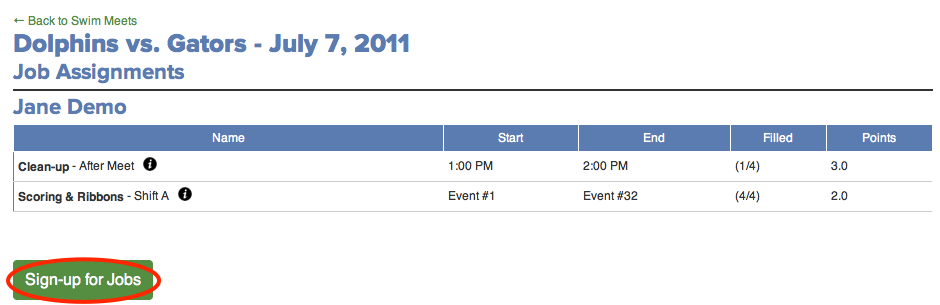
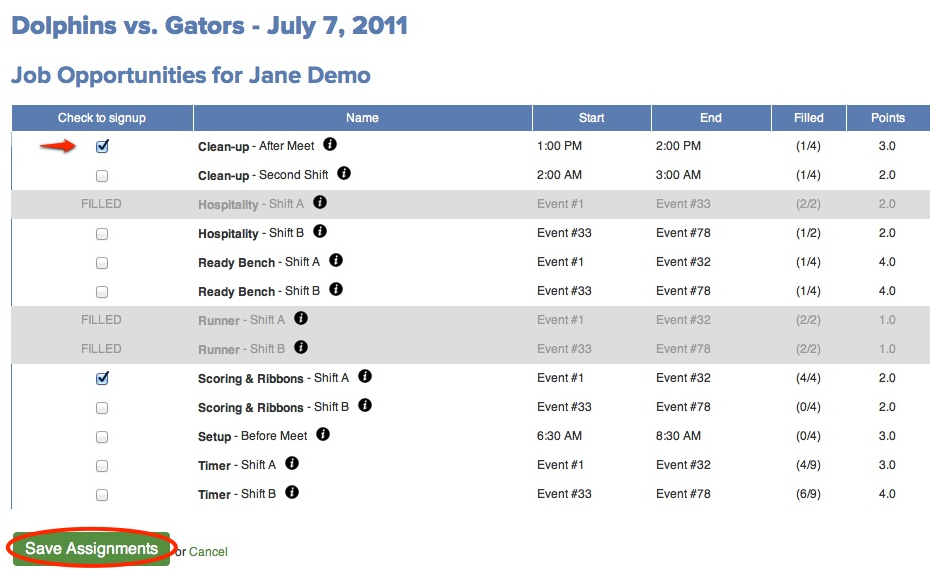
Make your changes by selecting or deselecting the checkbox next to each job, and clicking the Save Assignments button
- Click Save Assignments.
- Click Back to Signup Calendar.
If you are unable to fulfill your volunteer duties after sign ups have closed it is your responsibility to find a replacement and communicate that change to our volunteer coordinators or parent representative.
Please email [email protected] with any changes after volunteer sign ups have closed.


