
Swimmer Sign Up Instructions
Please declare your swimmer(s) as soon as you know their meet eligibility.
Login to the CSRC swim website using your email and password that you used to register your swimmers.
Chose the "Meets & Events" heading
Click on the green Meet Entry button to sign-up your athletes to participate in the meet.
Underneath you will see a list of athletes associated with your account. Click Edit to add or change their attendance, or to add comments for the coach (for example, swimmer will be late, can only swim in backstroke or beyond).
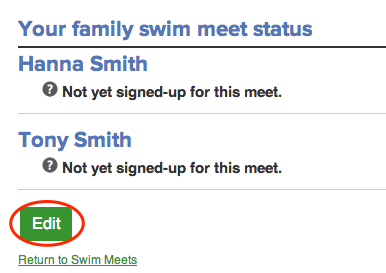
Select an attendance option from the drop-down menu next to each athlete's name.
If you forget to sign your athlete up for the meet they will be included by default BUT this adds to the total meet time/decreases efficiency for swimmers that are present, so please let us know if you will not be attending!
If you try to declare your swimmer and get the message that meet entries have closed, please reach out to a Coach, parent rep or [email protected] and we will add to the meet if able.


